
Thursday, December 10, 2009

New Search Engine Donates to the School or Charity of YOUR CHOICE

If you don't know, my youngest daughter, Grace, goes to Excel Christian Academy - a local private school. Although the purse strings are pulled tight, my husband and I feel it is important for her to get started in the right direction, especially these days. Being privately funded (by us PARENTS and fundraisers) every penny counts. At tonight's PTF meeting, we were told of a new search engine that donates a penny for EVERY SEARCH! I can't tell you how many searches I do a day, but I know it's a bunch! What a great way to earn money for her school - believe me, every penny DOES count! Great thing is that you can choose (or add your own) from thousands of charities. Read on.....


"As reported by the NY Times, Oprah Magazine, CNN, ABC News and the Wall Street Journal, here's a new easy way to raise money for your favorite cause. Just start using Yahoo! powered GoodSearch.com as your search engine and they'll donate about a penny to your favorite cause every time you do a search!
 GoodSearch.com is a new Yahoo-powered search engine that donates half its advertising revenue, about a penny per search, to the charities its users designate. Use it just as you would any search engine, get quality search results from Yahoo, and watch the donations add up!

 
Visit now and start earning for your school or charity! 

 http://www.goodsearch.com/


Where has my savvy-shopping fever gone?

For those that are still wondering where my weekly coupon shopping breakdowns have vanished to - I am on a self-proposed pantry/fridge/freezer use-it-all-up-no-buying-until-I-do mission. If wondering how this all came about, see the recent post about my "vaca" from shopping and my action plan.

To give an update, after three weeks with no coupon shopping, I have to say I am itching to get back into it. Each Sunday it's been hard not to print my list from Southern Savers and hit the stores. All week I read other blogs detailing their great finds and it's terrible! But alas, I am committed to waiting until after the first of the year to restock.

The cooking has been interesting to say the least. I've had to tweak recipes, create new ones and, well, sometimes we just eat one of the 30 cans of soup from the pantry! I believe that I will still have soup and boxes of cereal in my pantry come NEXT Christmas! (Actually I plan to donate what's left to Must Ministries come January.)

If you are just getting started (or plan to after the holidays), here are a few of the recipes I've made using just what I already have in the pantry – with modifications of course!


Chicken Parmesan – in my case, Chicken Mozzarella!
Recipe Source: Kraft Kitchen Holiday 2004 Magazine
6 Small boneless chicken breasts - I used four large ones from the freezer
26oz Jar of Spaghetti Sauce - I used 2 cans of Lasagna sauce I’ve had for ever instead
6 Tbsp Parmesan Cheese (I did not have, so didn’t add)
1½ cup of Mozzarella (I added 2 cups to make up for the missing parmesan)

Original Directions: Preheat over 375 degrees. Pour the sauce in the bottom of a 13 x 9in. casserole dish. Stir in 4 Tbsp of the parmesan. Lay the chicken in the sauce, flipping it once to cover with sauce. Cover with foil and bake 30 minutes. Uncover and top with mozzarella and remaining parmesan: continue baking 5 minutes or until cheese is melted and chicken is cooked through. Serve over pasta if desired. It was yummy!


Sheppard’s Pie
Recipe Source: Southern Living July 2008 Magazine
1 1/2lb. Ground Round
1 Cup Chopped Onion
8oz. Mushrooms – I used jarred from the pantry, of course
1 Garlic Clove. Minced
1 Cup frozen peas – I used canned from the pantry
4 tsp. beef bouillon – I used Worcestershire sauce
½ tsp salt
½ tsp. thyme
¼ tsp. pepper
1 Tbsp – Four, all purpose
1 Can stewed Tomatoes
1 Bay Leaf
2 Tbsp. Red wine vinegar
Top with Cheese and Carrot Mashed Potatoes (see below)

Brown beef. Remove beef but reserve the drippings in the pan. Reduce heat to medium and sauté the onions, mushrooms and garlic for 10 minutes. Stir in beef, peas and next 4 ingredients. Sprinkle flour over mixture and increase heat to medium-high. Cook, stirring constantly, 1 minute. Stir in tomatoes, bay leaf and vinegar. Reduce to medium and cook 3 minutes until thickened. Remove bay leaf. Place in a 3 quart dish, top evenly with potatoes mixture. Bake at 400 degrees for 15 minutes.

Cheese and Carrot Mashed Potatoes – sounds kind of gross, but if you remember it’s going into the Sheppard’s Pie, you’ll be fine


1lb. baby carrots
1 Tbsp. butter – (I have 3lbs. in the freezer!)
1 Carton Frozen or Deli Mashed Potatoes
1 Cup Shredded Cheddar
1 tsp. salt
¼ tsp. pepper

Steam carrots – to do this, place carrots and ¼ cup of water in a bowl. Cover tightly with plastic wrap, allowing one corner open to steam. Microwave on HIGH for 8 minutes. Add butter the steamed carrots and mash them (I used my pastry cutter!) Prepare potatoes according to directions. Add cheese, carrots and remaining mixture. These area actually pretty good by themselves, but go ahead and add them to the Sheppard’s Pie.

Are you on a pantry clearing spree too? Share your recipes! I am positive I have the ingredients somewhere around here!

Don’t know where to start? Check out my original post and pick a time to start - maybe after the holidays when your gluttony starts to get to you!


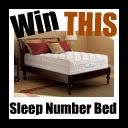
Win a Sleep Number Bed - FOR REAL!!!

Giveaway By Our Ordinary Life Blog - Ends Dec 15th


Thanks to Bless Their Hearts for passing on this great giveway! Who COULDN'T use one of these!(Approximate Retail value for the prize is $2,049.97 (Sleep Number p5 bed set plus UPS shipping).


From Sleepnumber themselves:
"There is nothing better then the gift of a great nights sleep. After Brooklin was born, my mother in law Brenda, helped Del and I out by taking Brooklin and telling us to have restful nights of sleep. The days after her birth were so wonderful, and I think it’s because I actually got to get some real sleep and be awake to enjoy our new baby. It was the best gift anyone could have given me. That is why any of the SLEEP NUMBER® beds would make the ultimate gift!


Did you know that 9 out of every 10 couples aren’t comfortable on the same bed. Del and I are this way, and we both do out own tossing and turning. It’s totally normal, that’s why SLEEP NUMBER® beds are so special. They make such a wonderful gift for couples because each side adjusts independently. It’s like living with your own mattress, and on any given night you can be soft or firm. They have 9 models of SLEEP NUMBER® beds which have been clinically tested to improve sleep quality and relief, and has helped 93 percent of the clinical study participants who reported back-pain.


The Sleep Number p5 Bed is Select Comforts most popular bed. It features a unique air-chamber design and breathable knit comfort layers. I can easily see why it’s the most popular bed. Its an adjustable bed with a luxury padded bed covering it."


Be sure to go over to Our Ordinary Life and enter to win!


Photobucket

Tuesday, December 8, 2009

Gifts in the Mail!


Look at the fabulous FREE sample I got in the mail today. A FULL SIZED 28 day supply of PRO-X. I love mail and I love surprise gifts even more! VocalPoint.com is a great site that sends out samples and you in turn review them on-line. I've only been a member since the beginning of September and this is already my 2nd surprise. The first was a sample of Secret Clinical Strength. Be sure to check them out!


This Blog Thing Is Not So Easy....

Well, after three days of trinkering with my blog and learning html code from scratch - I'm getting closer and closer to my vision. At first, I was going to just pay someone to do it, but true to form, the more I thought about it the more I was challenged to learn to do it myself. I spent the past month readings books, checking out other blogs, reading every possible "blogger" blog about customizing, watching tons of YouTube Videos and using trial and error. In the middle of all this I got some type of computer virus that almost drove me insane! Nothing worse than spending time writing code for your computer to lock down!

So you say my blog doesn't really look that different? What did I accomplish?

Here's where I am so far:

-I've learned how to read my blog's code!
-I've added the "third famous column" so many of us bloggers desire.
-I've extenened the width of my page. (If you notice, I still have one marign flaw in the main 
   post to fix - any ideas?!)
-I've centered all the sidebar text and images (a big one for me!)
-I've learned how to add a catagories list (still working on tweaking that before it goes live. It
   takes alot of time to change every label in every post for the past year!)
-I've learend how to add a navigation bar to my header but have decided not to at this point.
-I've leared how to manually change font, text sizes, text colors, margins, etc.
-I've added a social share widget to each post. (I am currently testing 2 types on the posts to
   see what I like the best)
-I've learned about adding pay-per-click affiliates.
-I've added a feedburner stat count. 

Whew! Talk about a HEADACHE! I couldn't go to sleep every night this week because I would think "I should have tried ..." or "What did I do wrong?" Believe me, I still have a LONG way to go, but I am pretty proud of myself for figuring out as much as I have.

Now I am working on designing my new header. I found a great YouTube Video that has helped me import and change images, add header text and where to chose my graphics. I am also working on my own blog "button." I love posting other blog's buttons on my site and want to be able to share my own.

I wish I had kept a running list of all the sites that I used to learn these things, but alas, in my frustration, I literally just clicked and clicked and clicked around using pieces here and there. Below are just a few of the main ones I used. I also learned that what works for someone else does not always work for everyone - but keep looking and eventually you will find the right code for you. Please visit these blogs if you are looking to venture into the vast HTML code!

How to center text and images in your sidebars - From Tricks-for-new-bloggers.com

How to add a 3-cloumn templete in Blogger - From Bloggerbuster.com

How to add a border to your sidebars - MomsWhoBlog.com

How to Create a Custom Header in Blogger - YuoTube Video

Now if I can just figure out how to get Spellchecker back on my post page I think I will be in Heaven!

While you are here - PLEASE see the poll in the sidebar. I want to be able to add my new name to the header, favicon and blog button I am currently creating. Thanks!